Qualifying a lead
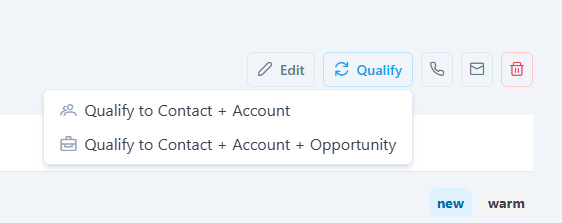
Qualifying is how you turn a lead into a working deal. Clicking Qualify on the lead detail page opens a menu with two options: Qualify to Contact + Account and Qualify to Contact + Account + Opportunity. Choosing the second opens the "Qualify Lead: Contact, Account and Opportunity" window. This one step creates three linked records at once: a contact, an account, and an opportunity.
The window has three sections. HurPal CRM pre-fills what it can from the lead, and you can adjust each field before submitting.
Contact section
The person you will work with. These fields come from the lead's existing data.
| Field | Required | Description |
|---|---|---|
| First Name | No | The contact's first name. |
| Last Name | Yes | The contact's last name. |
| Yes | The contact's email address. | |
| Primary Phone | No | The contact's primary phone number. |
Account section
The company the new contact will belong to.
| Field | Required | Description |
|---|---|---|
| Account Name | Yes | The company name. This can be an existing account or a new one. |
| Sales Owner | No | The user who will own the account, chosen from a searchable list. Use the clear button to remove the selection. |
Opportunity section
The deal you will pursue.
| Field | Required | Description |
|---|---|---|
| Opportunity Name | Yes | The name of the deal. It defaults to the lead name. |
| Sales Owner | Yes | The user who will own the opportunity. |
| Stages Group | Yes | The pipeline this opportunity belongs to, for example Sales Pipeline. |
| Stage | Yes | The starting stage within that pipeline, for example Qualification. |
If the pipeline you need does not exist yet, use Add Pipeline Stage Group to create one.
Actions
| Button | What it does |
|---|---|
| Cancel | Closes the window without qualifying the lead. |
| Qualify | Submits the form and converts the lead. |
What happens when you qualify
When you click Qualify, HurPal CRM creates and links the records together in a single operation:
- The account is created (or matched) and set as the company for the new contact and opportunity.
- The contact is created, marked as the account's primary contact, and recorded as having come from this lead.
- The opportunity is created in the pipeline stage you chose and linked to both the account and the contact.
- The lead is marked as converted, its status changes to converted, and its conversion date is recorded.
Required fields are marked with a red asterisk. A lead can be qualified only once. After conversion, continue working the deal from the new opportunity.