Opportunities kanban
The kanban board presents all opportunities as cards organized into columns by pipeline stage. It gives you a visual, board-style view of the pipeline as an alternative to the standard list.
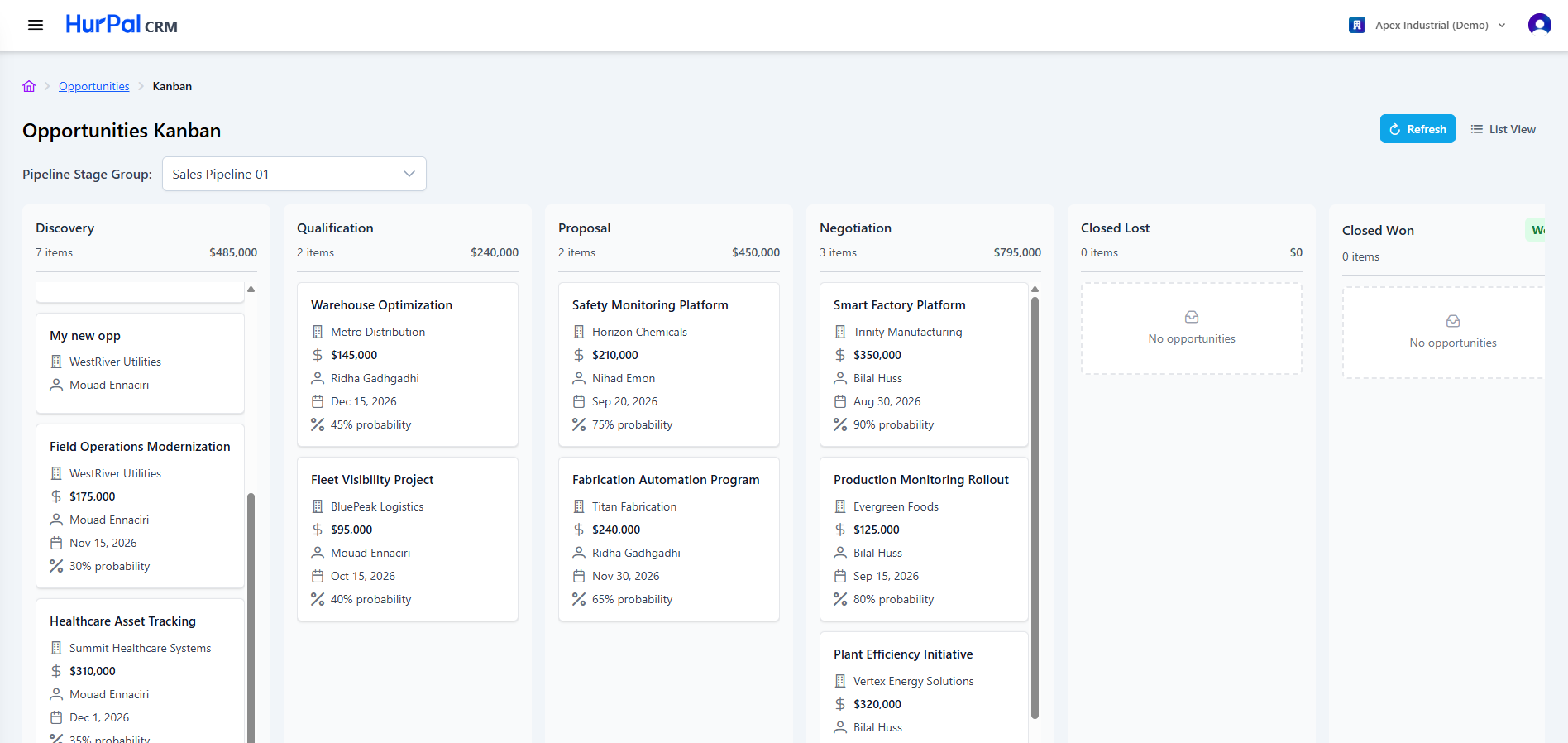
Toolbar
| Control | What it does |
|---|---|
| Pipeline Stage Group | Selects which pipeline the board reflects. |
| Refresh | Reloads the board with the latest data. |
| List View | Switches from the board to the standard list of opportunities. |
Columns
Opportunities are grouped into columns by pipeline stage, for example:
- Discovery
- Qualification
- Proposal
- Negotiation
- Closed Lost
- Closed Won
note
The stages you see depend on the pipeline selected in the Pipeline Stage Group dropdown, so your columns may differ from the example above.
Each column header shows two figures:
- Item count: the number of opportunities in the column.
- Total value: the combined deal amount for the opportunities in the column.
Moving opportunities
Drag a card from one column to another to update its status. When a column has no opportunities, it shows an empty-state message with an inbox icon.
tip
Use the board for a quick read of where your deals stand, then open a card to work on the opportunity detail page.