Opportunities list
The Opportunities screen lists every deal in the CRM as a standard table, as an alternative to the kanban board.
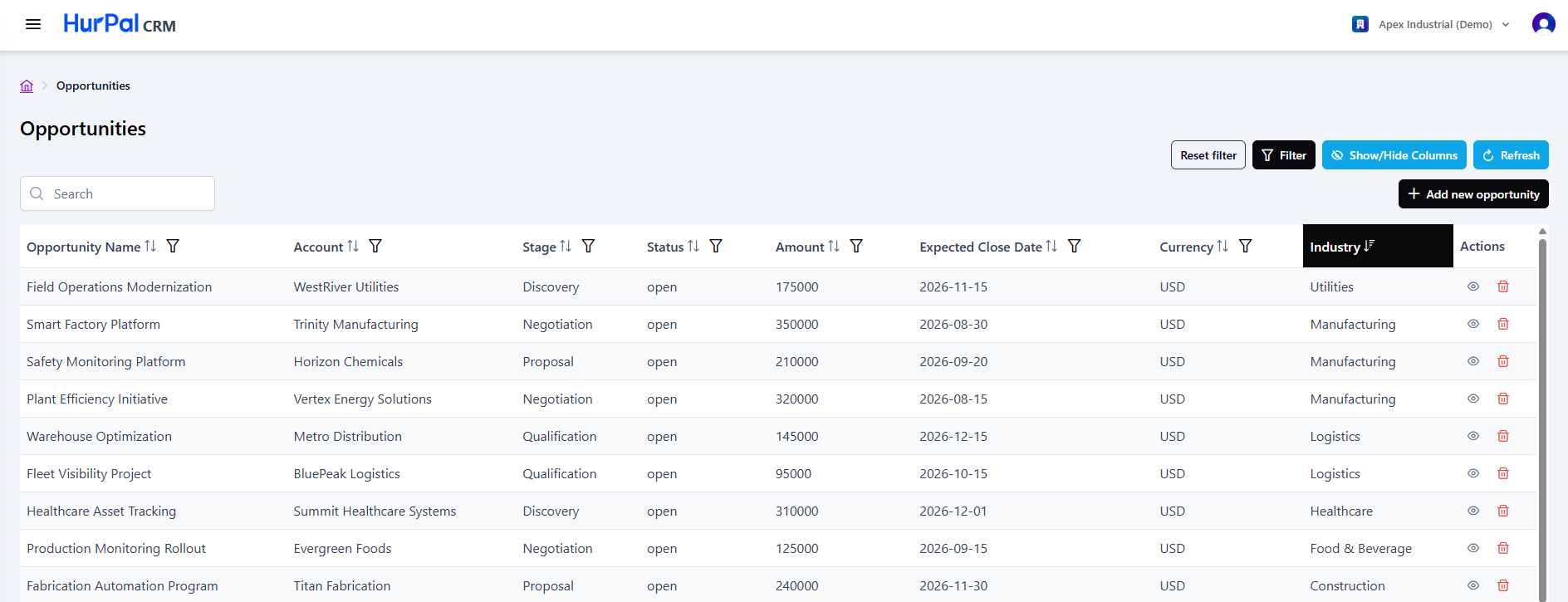
Toolbar
| Control | What it does |
|---|---|
| Search | Free-text search to find opportunities. |
| Reset filter | Clears all applied filters. |
| Filter | Opens the advanced filtering options for the list. |
| Show or hide columns | Chooses which columns are visible in the table. |
| Refresh | Reloads the list with the latest data. |
| Add new opportunity | Opens a form to create an opportunity manually. |
Opportunities table
The table lists opportunities across the columns below. Most columns can be sorted and filtered.
| Column | Description |
|---|---|
| Opportunity Name | The name of the deal. Click it to open the opportunity detail page. |
| Account | The account the opportunity belongs to. |
| Stage | The opportunity's current pipeline stage, for example Negotiation. |
| Status | The opportunity's current status: open, won, or lost. |
| Amount | The deal value. |
| Expected Close Date | The anticipated close date. |
| Currency | The currency the deal is valued in, for example USD. |
| Industry | The industry of the associated account. |
| Actions | Row actions: view (eye) to open the opportunity, and delete (trash) to remove it. |
Switching views
Use List View on the kanban board to switch to this table, or switch back to the board from here for a visual read of the pipeline.